
A large language model can write poetry and explain quantum mechanics, but ask it to check your bank balance and it's stuck. Function calling changes that. It gives an LLM a catalog of real-world operations it can request, lets your application execute them, and feeds the results back for reasoning. This single capability separates a chatbot from an AI agent.
Every example in this article builds on the same scenario: a personal finance assistant that checks balances, transfers money, and generates spending reports.
How Function Calling Works Under the Hood
Function calling is a structured protocol between your application and an LLM. Rather than executing code directly, the LLM outputs a JSON object describing which function to call and what arguments to pass. Your code handles execution, then sends the result back for interpretation.
Here's the full cycle for our finance assistant:
- You define tool schemas alongside the user's message, describing function names, parameters, and descriptions.
- The LLM reads the prompt and schemas. When the user says "What's my checking account balance?", it picks
get_balance. - It outputs structured JSON:
{"name": "get_balance", "arguments": {"account_type": "checking"}}. - Your application calls the actual
get_balancefunction and gets{"balance": 4821.50}. - You send the result back as a tool result message.
- A natural response follows: "Your checking account balance is $4,821.50."
 Function calling flow from user request through LLM to tool execution and response
No database access, no HTTP requests from the LLM itself. It produces structured text, and your code does the rest.
Key Insight: Function calling isn't the LLM "running code." It's the LLM producing structured output that your application interprets as an instruction. One side reasons; the other executes.
Defining Tool Schemas with JSON Schema
Tool schemas tell the LLM what functions exist and what arguments each expects. Good descriptions matter more than you'd think, because they're used to match user intent to the right tool. Vague descriptions lead to wrong tool selection.
Here's the complete schema set for our finance assistant in OpenAI's format:
tools = [
    {
        "type": "function",
        "function": {
            "name": "get_balance",
            "description": "Retrieve the current balance for a specific bank account. Use when the user asks about how much money they have.",
            "parameters": {
                "type": "object",
                "properties": {
                    "account_type": {
                        "type": "string",
                        "enum": ["checking", "savings", "credit"],
                        "description": "The type of bank account to check"
                    }
                },
                "required": ["account_type"],
                "additionalProperties": False
            }
        }
    },
    {
        "type": "function",
        "function": {
            "name": "transfer_money",
            "description": "Transfer money between the user's own accounts. Requires source, destination, and amount.",
            "parameters": {
                "type": "object",
                "properties": {
                    "from_account": {
                        "type": "string",
                        "enum": ["checking", "savings"],
                        "description": "Source account for the transfer"
                    },
                    "to_account": {
                        "type": "string",
                        "enum": ["checking", "savings"],
                        "description": "Destination account for the transfer"
                    },
                    "amount": {
                        "type": "number",
                        "minimum": 0.01,
                        "description": "Dollar amount to transfer"
                    }
                },
                "required": ["from_account", "to_account", "amount"],
                "additionalProperties": False
            }
        }
    },
    {
        "type": "function",
        "function": {
            "name": "get_spending_report",
            "description": "Generate a categorized spending report for a given month. Returns totals by category like groceries, dining, utilities.",
            "parameters": {
                "type": "object",
                "properties": {
                    "month": {
                        "type": "string",
                        "description": "Month in YYYY-MM format, e.g. 2026-03"
                    },
                    "account_type": {
                        "type": "string",
                        "enum": ["checking", "credit", "all"],
                        "description": "Which account to report on. Defaults to all."
                    }
                },
                "required": ["month"],
                "additionalProperties": False
            }
        }
    }
]
Notice the patterns: enum everywhere possible to prevent hallucinated values like "investment" for an account that doesn't exist, natural language descriptions for intent matching, and additionalProperties: false on every object, which is mandatory for structured outputs with strict mode.
Pro Tip: Write function descriptions from the user's perspective, not the developer's. "Use when the user asks about how much money they have" works better than "Queries the accounts table and returns the balance field." Intent-matching hints beat implementation details.
Schema Design Principles
In my experience shipping production agents, these principles save hours of debugging:
- One function per action. Don't bundle
get_balanceandtransfer_moneyinto a singlemanage_accountfunction. Tool selection improves dramatically when each tool does one thing. - Use enums aggressively. If a parameter has a finite set of valid values, list them. This eliminates an entire class of hallucinated arguments.
- Mark optional parameters explicitly. If
account_typedefaults to "all" inget_spending_report, make it optional in the schema and let your function handle the default. - Keep descriptions under 100 words. Long descriptions dilute attention. Be precise, not verbose.
The Tool Use Loop: Single-Turn and Multi-Turn
Tool calling gets interesting when a single user message requires multiple functions. Should the calls happen in sequence (each result informing the next) or in parallel (all at once, if independent)?
Single-Turn Tool Calling
The simplest case: one user message, one tool call, one result. "What's my savings balance?" triggers get_balance(account_type="savings"), the result comes back, and a response follows. One round trip.
Parallel Tool Calling
When the user says "Transfer $500 to savings and show me my spending this month," two independent operations are needed. With parallel tool calling enabled, both calls are emitted in a single response:
# Two tool calls returned in one response
tool_calls = [
    {
        "id": "call_abc123",
        "function": {
            "name": "transfer_money",
            "arguments": '{"from_account":"checking","to_account":"savings","amount":500}'
        }
    },
    {
        "id": "call_def456",
        "function": {
            "name": "get_spending_report",
            "arguments": '{"month":"2026-03","account_type":"all"}'
        }
    }
]
Your application executes both, collects the results, and sends them back. The synthesized response: "Done! I've transferred $500 from checking to savings. Here's your March spending: Groceries $423, Dining $187, Utilities $156..."
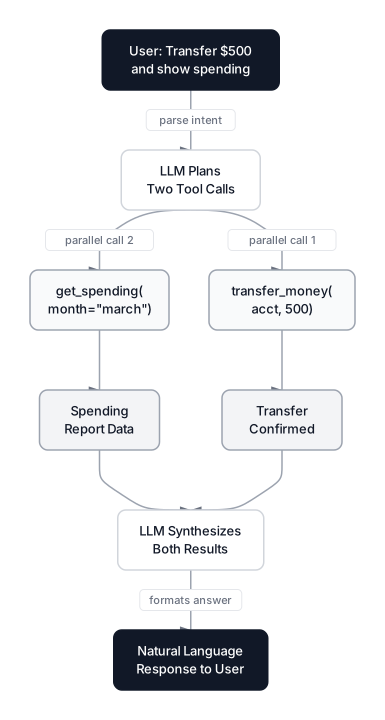 Multi-turn tool conversation showing parallel tool calls for transfer and spending report
Multi-Turn Tool Calling
Sometimes tools must chain. "Transfer my entire savings balance to checking" requires two sequential calls: first get_balance(account_type="savings") to learn the amount, then transfer_money(from_account="savings", to_account="checking", amount=<result>). The second call depends on the first.
This creates a multi-turn loop:
- Call
get_balance, your code returns $2,340 - With that result in hand, call
transfer_moneywith amount=2340 - Your code executes the transfer and returns confirmation
- Final response delivered to the user
Each round trip adds latency, which is why parallel calling matters. A framework like Claude Agent SDK handles this loop automatically, but understanding the mechanics helps you debug when things break.
Common Pitfall: Don't assume independent calls will always be parallelized. Some models are conservative and call tools sequentially even when parallel execution is safe. If latency matters, test with your specific model and prompt.
Provider Approaches to Tool Use
OpenAI, Anthropic, and Google all support function calling, but their implementations differ in ways that affect architecture decisions. As of March 2026, GPT-5.4 is OpenAI's newest model, Claude Opus 4.6 leads Anthropic's lineup, and Gemini 3.1 Pro is Google's flagship.
| Feature | OpenAI (Responses API) | Anthropic (Claude API) | Google (Gemini API) |
|---|---|---|---|
| Schema format | JSON Schema in tools[] | JSON Schema in tools[] | OpenAPI-style in tools[] |
| Strict mode | On by default | Type-safe validation | Native schema enforcement |
| Parallel calls | Supported (disable for strict) | Supported | Supported |
| Streaming tool calls | Yes | Fine-grained streaming (GA) | Streaming partial args |
| Tool count scaling | Tool search | Tool search indexes thousands | Hundreds per request |
| Latest model | GPT-5.4 (Mar 2026) | Claude Opus 4.6 (Feb 2026) | Gemini 3.1 Pro (Feb 2026) |
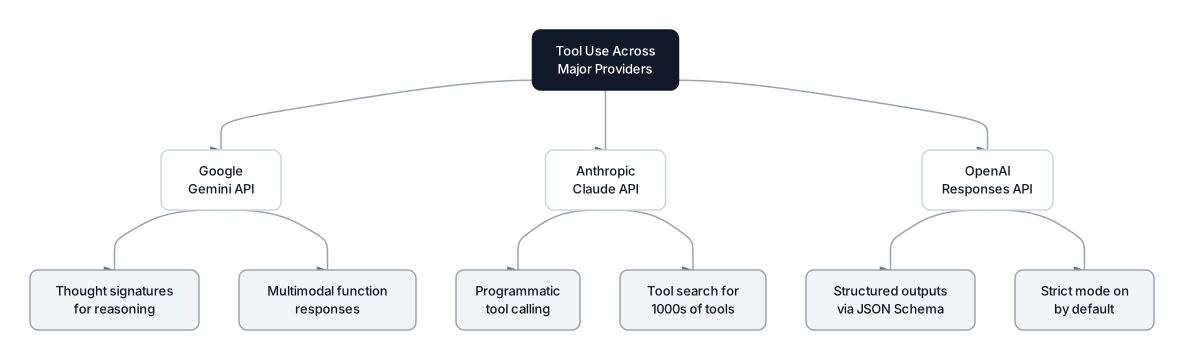 Provider comparison showing OpenAI, Anthropic, and Google tool use approaches
OpenAI's Approach
OpenAI's Responses API sets strict: true by default, guaranteeing tool call output matches your JSON Schema through constrained decoding. The catch: strict mode is incompatible with parallel tool calls, so you choose one or the other. GPT-5.4 (released March 5, 2026) brings tool search and a 1M-token context window. Preambles, introduced with GPT-5.2, let the LLM explain its reasoning before each tool call, boosting selection accuracy.
from openai import OpenAI
client = OpenAI()

response = client.responses.create(
    model="gpt-5.4",
    input=[{"role": "user", "content": "What's my checking balance?"}],
    tools=tools,
    parallel_tool_calls=False  # required for strict mode
)
Anthropic's Approach
Claude stands out with two features that matter at scale. Programmatic tool calling lets Claude write Python code to orchestrate multiple tools inside a sandboxed environment, reducing round trips and cutting token usage by up to 85.6% according to Anthropic's benchmarks. Instead of each tool result returning for reasoning, Claude writes a script that processes intermediate results and surfaces only the final output. Tool search lets you register thousands of tools in a search index that Claude queries dynamically rather than stuffing all schemas into context.
import anthropic
client = anthropic.Anthropic()

response = client.messages.create(
    model="claude-opus-4-6",
    max_tokens=1024,
    tools=tools,  # same schema format, different wrapper
    messages=[{"role": "user", "content": "Transfer \$500 to savings"}]
)
Google's Approach
Gemini 3.1 Pro (preview since February 19, 2026) supports multimodal function responses: your tool can return images or PDFs alongside structured data, and the LLM reasons over all of it natively. For our finance assistant, get_spending_report could return a chart image alongside the numbers. Gemini also uses thought signatures, encrypted snapshots of internal reasoning that must be passed back in subsequent turns. Missing a thought signature triggers a 400 error, so your application code must handle this.
Open Source Models
Open source has caught up fast. Qwen3.5-397B-A17B combines a massive MoE architecture with native tool calling, including code interpreters and image search during multimodal reasoning. Mistral's latest models handle function calling natively without special prompting. On the BFCL V4 leaderboard from UC Berkeley, Claude Opus 4.1 leads at 70.36%, with Claude Sonnet 4 close behind at 70.29%. In practice, open source works well for single-tool scenarios but still struggles with complex multi-turn orchestration.
Structured Outputs and Type Safety
The worst failure mode in function calling isn't a wrong answer. It's a malformed tool call. If {"amount": "five hundred"} arrives instead of {"amount": 500}, your code crashes or silently does the wrong thing. Structured outputs solve this through constrained decoding: as each token is generated, a logit processor masks tokens that would violate the schema. If amount requires a number, string tokens become impossible in that position. The result is 100% schema compliance.
All three major providers enforce this: OpenAI's strict: true (default in the Responses API), Anthropic's type-safe validation, and Google's native schema enforcement. You can skip defensive type checking and trust that arguments match their declared types.
Key Insight: Constrained decoding doesn't just prevent errors. It removes an entire category of runtime failures. Before structured outputs, production tool-calling systems needed extensive try/catch blocks and type coercion logic. Now that's handled at the generation layer.
One tradeoff worth noting: OpenAI's strict mode requires additionalProperties: false on all schema objects, and all properties must be listed in required. Optional parameters need "type": ["string", "null"] rather than simply being omitted from required.
Error Handling in Production
In production, tools fail. APIs time out. Databases go down. You need a strategy for all of these.
Hallucinated Function Names
Even with tool schemas provided, models occasionally invent functions. I've seen Claude call check_account_status when the actual function is get_balance. The fix: validate every function name against your registered tool set before execution.
REGISTERED_TOOLS = {"get_balance", "transfer_money", "get_spending_report"}

def dispatch_tool_call(tool_call):
    name = tool_call["function"]["name"]
    if name not in REGISTERED_TOOLS:
        return {
            "error": f"Unknown function: {name}. Available: {', '.join(REGISTERED_TOOLS)}"
        }
    args = json.loads(tool_call["function"]["arguments"])
    return execute_function(name, args)
Sending the error back as a tool result often works. The LLM reads "Unknown function," recognizes the mistake, and retries with the correct name.
Tool Execution Failures
When transfer_money fails because of insufficient funds, don't swallow the error. Return it as a structured result:
def transfer_money(from_account, to_account, amount):
    balance = get_account_balance(from_account)
    if balance < amount:
        return {
            "success": False,
            "error": "insufficient_funds",
            "available_balance": balance,
            "requested_amount": amount
        }
    # proceed with transfer...
With this structured error, the response becomes: "You only have $320 in checking, so I can't transfer $500. Would you like to transfer $320 instead?" Far better than a generic "Something went wrong."
Retry Strategy
For transient failures (network timeouts, rate limits), implement retries with exponential backoff at the application layer. If the tool fails after three attempts, return a clean error and let the LLM explain the situation.
Pro Tip: Always set a timeout on tool execution. If your finance API hangs for 30 seconds, the user experience degrades fast. A 5-second timeout with a structured error message gives the LLM enough context to suggest trying again later.
Security and Guardrails for Tool Use
Giving an LLM the ability to move money is risky. Indirect prompt injection can manipulate an agent into calling functions it shouldn't. Prompt injection now sits at the top of the OWASP Top 10 for LLM Applications, and the February 2026 "Promptware Kill Chain" paper formalized how tool-calling agents transform prompt injection from an information leak into an operational threat.
A newer class of attacks targets multi-tool environments: cross-tool contamination and tool shadowing, where one MCP server overrides or interferes with another, creating data exfiltration pathways.
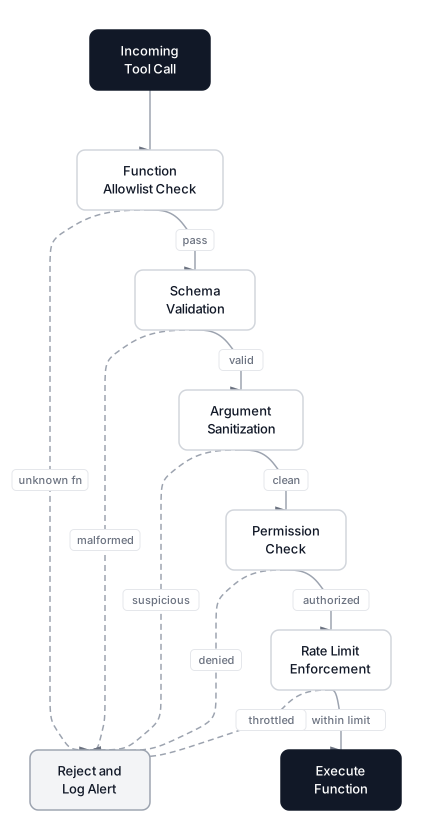 Production security layers for tool call validation from allowlist through execution
Five Security Layers
1. Function Allowlist. Only register functions the agent is allowed to call. If delete_account exists in the schema, assume it will eventually be called.
2. Argument Validation. Validate beyond what the schema enforces. The schema says amount is a number; your validation layer enforces amount <= 10000 and rejects negative values.
3. Permission Checks. Tie every tool call to the authenticated user's permissions. Verify daily transfer limits, account ownership, and session validity.
4. Rate Limiting. Cap tool calls per conversation. A prompt injection attack might loop transfers; ten calls per conversation limits the blast radius.
5. Human-in-the-Loop. For our finance assistant, any transfer above $1,000 requires explicit confirmation before execution.
Common Pitfall: Relying on system prompt instructions like "Never transfer more than $1,000" is not security. It's a suggestion. Prompt injection can override system prompts. Real security lives in your application code, not in the LLM's instructions.
Audit Logging
Log every tool call with full arguments, user ID, conversation ID, and timestamp. When something goes wrong (and it will), these logs are how you trace what happened.
When to Use Function Calling
Function calling is powerful, but it's not always the right choice. Here's a decision framework.
Use Function Calling When
- Live data is needed. Account balances, stock prices, weather, search results. Anything not in training data.
- The request requires a side effect. Sending emails, creating records, transferring money.
- You need structured interaction with APIs. Natural language intent translated into precise API calls is exactly what function calling was designed for.
- Multiple tools might be needed per request. Dynamic tool selection and composition is the foundation of ReAct-style agents.
Do NOT Use Function Calling When
- The task is pure text generation. Writing, summarization, translation. No external data or side effects needed.
- A deterministic pipeline works. If you always call the same APIs in the same order, write a regular program.
- You need guaranteed execution order. Function calling introduces nondeterminism. If order matters, enforce it in application code.
- Latency is critical. Each tool call adds a network round trip. Consider pre-fetching data and including it in context instead.
Conclusion
Function calling bridges the gap between models that talk and agents that act. The mechanic is deceptively simple: output JSON, execute function, feed result back. Production reality involves careful schema design, multi-turn orchestration, and security layers that can't be afterthoughts.
The ecosystem has matured rapidly through early 2026. OpenAI's GPT-5.4 brings tool search and a 1M-token context window. Anthropic's programmatic tool calling slashes token usage by 85% for multi-tool workflows, while tool search scales to thousands of registered functions. Gemini 3.1 Pro's multimodal function responses and thought signatures open new interaction patterns. Meanwhile, MCP has moved from experimental concept to production-ready protocol adopted by all three providers, standardizing how agents discover and connect to tools.
Function calling is one piece of a larger agent stack. You'll also need memory systems for context across sessions, a solid understanding of how LLMs actually work under the hood, and a framework to handle the orchestration loop. Start with the simplest tool loop that works, add security from day one, and expand from there.
Frequently Asked Interview Questions
Q: What is function calling and how does it differ from a regular API call?
In a regular API call, your code decides which endpoint to hit deterministically. With function calling, the LLM decides which function to invoke based on natural language input and outputs structured JSON, while your code handles execution. This makes function calling the backbone of AI agents: the LLM reasons about what action to take, your application carries it out.
Q: How does constrained decoding enforce structured outputs at the token level?
A logit processor sits between the output distribution and the sampling step. At each token position, it masks tokens that would violate the target JSON Schema. If a field requires a number, string tokens become impossible to generate. OpenAI enables this by default with strict: true in the Responses API, delivering 100% schema compliance without post-processing.
Q: A user asks your finance agent to "transfer all my money to account X." How do you handle this safely?
First, verify the user is authenticated and account X belongs to them. Then recognize that finding the balance requires a get_balance call before attempting the transfer. Enforce transfer limits at the application layer, require human confirmation above a threshold, and cross-check the transfer amount against the balance result independently.
Q: Explain Anthropic's programmatic tool calling and when you'd choose it over standard tool use.
Programmatic tool calling lets Claude write a Python script that orchestrates multiple tools inside a sandboxed environment, processing intermediate results and surfacing only the final output. Anthropic reports an 85.6% reduction in total tokens. Choose it for multi-tool workflows where intermediate results don't need reasoning; use standard tool use when each result informs the next decision.
Q: What are thought signatures in Gemini's function calling?
Thought signatures are encrypted snapshots of Gemini 3's internal reasoning state that must be passed back in subsequent API turns during multi-turn function calling. Omitting them triggers a 400 error. This differs from OpenAI and Anthropic, where conversation history alone suffices for multi-turn continuity.
Q: How do you defend a tool-calling agent against indirect prompt injection?
Defense requires a layered architecture: function allowlists, argument validation at the application layer, per-user permission scoping, rate limiting on tool calls, and human-in-the-loop for sensitive operations. Assume the LLM will eventually be tricked and design your execution layer so a compromised model can't cause catastrophic damage.
Q: Compare how OpenAI, Anthropic, and Google handle large numbers of tools.
Anthropic pioneered tool search, letting you register thousands of tools in an index queried dynamically. OpenAI added tool search with GPT-5.4. Google supports hundreds of tools per request natively. For fewer than 20 tools, pass them all directly. Beyond that, tool search becomes essential to avoid wasting context tokens on irrelevant schemas.
Q: When would you choose NOT to use function calling?
Skip function calling when the workflow is deterministic (same tools, same order every time), when no external data or side effects are needed, or when latency constraints don't allow extra round trips. If you can pre-fetch all needed data and include it in the context window, that's often faster and more reliable than real-time tool calls.