
On February 2, 2025, Andrej Karpathy fired off what he later called a "shower of thoughts throwaway tweet." He described a new kind of coding where you "fully give in to the vibes, embrace exponentials, and forget that the code even exists." He named it vibe coding. That tweet racked up over 4 million views. By November 2025, Collins Dictionary crowned it their Word of the Year. It stuck because it captured something millions of developers were already feeling: writing software was fundamentally changing.
Sarah, a full-stack developer at a mid-size startup, experienced this shift firsthand. Her manager asked her to build an internal expense tracker. Rather than scaffolding the project manually, she opened Cursor, typed "Create a Next.js expense tracker with Supabase auth, a dashboard showing spending by category, and receipt upload with OCR," and watched the AI generate the entire project skeleton in under two minutes. That moment, when describing intent replaced typing syntax, is vibe coding in practice.
What Vibe Coding Actually Means
Vibe coding is not autocomplete with better marketing. It represents a genuine shift in how developers interact with codebases. Traditional development forces you to think in syntax. Vibe coding lets you think in outcomes. You describe what a feature should do, and AI handles the translation to working code.
A spectrum runs from assisted to autonomous. At the simplest level, GitHub Copilot suggests the next line based on context. One step up, you're chatting with an AI in your editor, describing multi-file changes in plain English. Further along, agent-mode tools plan a sequence of edits, run tests, fix failures, and iterate without your intervention. At the extreme end, tools like Devin accept a Jira ticket and deliver a pull request hours later.
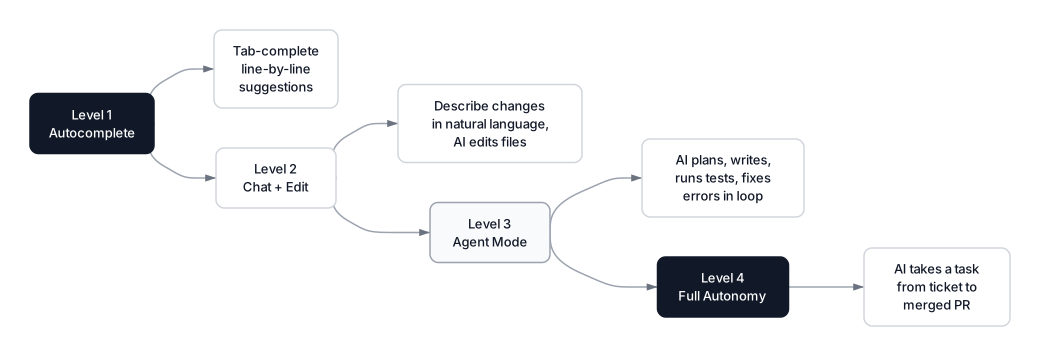 Click to expandThe vibe coding spectrum from autocomplete to full autonomy
Simon Willison drew an important distinction early on: not all AI-assisted programming qualifies as vibe coding. Using Copilot to complete a function you already understand is AI-assisted coding. Vibe coding, as Karpathy originally defined it, means accepting AI-generated code without fully reviewing the diffs. That distinction matters, because it shapes how you should think about risk, quality, and where these tools actually fit in your workflow.
Key Insight: Most working developers operate in a hybrid zone. Sarah vibed the initial scaffolding of her expense tracker, letting AI generate the project structure and boilerplate. But she reviewed every line of authentication logic and payment endpoints. Pure vibe coding works for prototypes and internal tools. Production systems demand more human oversight.
Adoption numbers confirm this isn't a niche trend. According to the JetBrains State of Developer Ecosystem 2025 survey (24,534 developers across 194 countries), 85% regularly use AI tools for coding. Google Trends shows a 2,400% increase in searches for "vibe coding" since January 2025. Among Y Combinator's Winter 2025 cohort, 25% of companies have codebases that are 95% or more AI-generated.
How AI Coding Assistants Work Under the Hood
Every AI coding assistant, regardless of branding, runs the same fundamental loop. Understanding this loop explains why they sometimes produce brilliant code and sometimes hallucinate nonexistent APIs.
 Click to expandHow AI coding assistants process your code
Context gathering is where it starts. When Sarah types a prompt in Cursor, the tool doesn't just send her words to a model. It collects her current file, the cursor position, open tabs, import statements, the project's package.json, and often the directory tree. This context window determines output quality. A model that sees your database schema alongside your API route handler will generate better code than one that only sees the handler.
Retrieval takes this further. Modern tools maintain a codebase index, essentially an embedding-based search index of your entire repository. When Sarah asks "add expense categorization to the dashboard," the tool retrieves her existing Expense type definitions, the current dashboard component, and the Supabase query patterns she's already using. Both Cursor and Claude Code support the Model Context Protocol (MCP), letting them pull documentation from external sources directly into the prompt. Without this retrieval layer, the model generates plausible-looking code that doesn't match your codebase's actual patterns.
Model inference is where the large language model processes assembled context and generates code. Autocomplete generates a few lines inline. Chat mode produces a complete file or function. Agent mode generates a plan, then executes multiple edits across files, runs terminal commands, and loops on test results.
Validation closes the loop. In agent mode, the AI runs npm test, checks for TypeScript errors, reads the output, and adjusts its code. When Sarah's expense tracker had a failing Supabase RLS policy, Claude Code read the error, identified the missing policy, wrote the SQL migration, and re-ran the test suite. This plan-execute-observe cycle is the same agentic pattern used in AI agents more broadly. At its core, a coding assistant is an AI agent with tools: a code editor, a terminal, a file system, and a browser.
Major Tools in March 2026
Several distinct approaches have emerged, each reflecting a different philosophy about how humans and AI should collaborate on code.
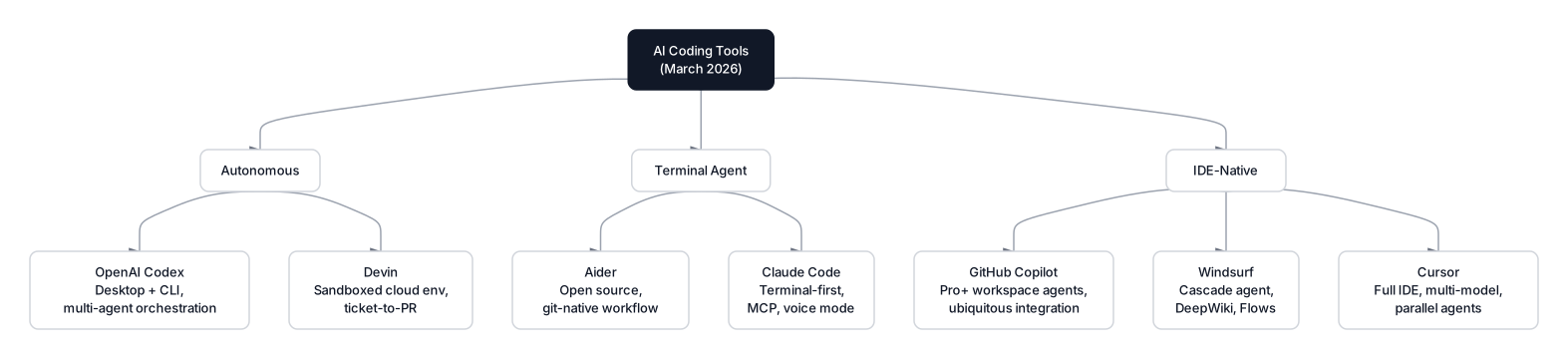 Click to expandAI coding tools organized by category
Cursor is the fastest-growing SaaS product in history. Built by Anysphere, it crossed $1 billion ARR in under 24 months and hit $2 billion ARR by March 2026, doubling in just three months. Its $2.3 billion Series D in November 2025 valued the company at $29.3 billion. Over 1 million developers use it daily. A forked VS Code rebuilt around AI, its Tab prediction feels almost telepathic, finishing multi-line blocks based on patterns elsewhere in your codebase. Cursor 2.0 launched parallel agents running on isolated cloud VMs, letting you spin up 10 to 20 background agents working on different features simultaneously. It's the tool Sarah uses for daily work because the feedback loop is instant: write a comment, Tab-complete through the implementation, move on.
Claude Code takes a radically different approach by running in your terminal. No GUI, no editor chrome. You describe what you want, and it reads your codebase, writes code, runs commands, and commits changes. Anthropic shipped native voice mode in March 2026: hold the space bar, speak your intent, release, and watch Claude execute. Claude Opus 4.5 scores 80.9% on SWE-bench Verified, the highest of any model. Sarah uses it for larger refactors where a terminal agent shines: "migrate the expense API from REST to tRPC and update all callers."
Pro Tip: Match your tool to the task. Cursor excels at rapid iteration within a single file or component. Claude Code is stronger for multi-file refactors and codebase-wide changes. Using the wrong tool for the job is the fastest way to lose time.
GitHub Copilot remains the most widely adopted tool, with 4.7 million paid subscribers as of January 2026 and over 20 million cumulative users. A peer-reviewed study found developers using Copilot completed tasks 55% faster on average. Ninety percent of Fortune 100 companies have adopted it. Its advantage is ubiquity: it works in VS Code, JetBrains, Neovim, and GitHub.com. A Free tier offers 2,000 completions and 50 chat messages per month, making it the easiest on-ramp. Copilot now supports multiple models including Claude, GPT, and Gemini, and Pro+ ($39/month) added workspace agents and multi-editor support in late 2025.
Windsurf had one of 2025's wildest acquisition stories. In July 2025, Google hired away its CEO and research leaders in a $2.4 billion reverse-acquihire, just days after OpenAI's $3 billion offer collapsed. Cognition then acquired Windsurf's IP, product, and brand for approximately $250 million that same month. Windsurf brought $82 million ARR and 350+ enterprise customers. Its Cascade agent handles multi-file reasoning, and DeepWiki provides instant symbol-level documentation.
Aider is the open-source alternative. Git-native by design, it stages changes as proper commits with descriptive messages. It supports over 100 programming languages and works with Claude, GPT, Gemini, or local models via Ollama.
A separate category of full-stack AI platforms targets rapid prototyping and non-technical builders. Replit Agent generates and deploys entire applications inside its cloud IDE. Bolt.new and Lovable let you describe an app in a single prompt and get a working, deployed prototype in minutes. Amazon Q Developer covers IDE completions, CLI assistance, and AWS-specific code generation with enterprise compliance built in.
| Tool | Category | Best For | Price | Model Access |
|---|---|---|---|---|
| Cursor | AI IDE | Daily coding, rapid prototyping | $20/mo | Claude, GPT, Gemini, custom |
| Claude Code | Terminal Agent | Complex refactors, multi-file changes | API usage-based | Claude Opus, Sonnet |
| GitHub Copilot | IDE Plugin | Teams already on GitHub, broad IDE support | Free, $10-39/mo | Claude, GPT, Gemini |
| Windsurf | AI IDE (Cognition) | Large codebase comprehension | $15/mo | Multi-model |
| Aider | Open Source CLI | Privacy-conscious devs, git-native workflow | Free + API costs | Any OpenAI-compatible |
| Replit Agent | Cloud IDE | Full-stack prototyping in the browser | Free, $25/mo+ | Multi-model |
| Amazon Q Developer | IDE Plugin / CLI | AWS-integrated teams, enterprise compliance | Free, $19/user/mo | Amazon Bedrock models |
| Bolt.new | Browser App | Instant full-stack prototypes from a prompt | Free, $20/mo+ | Claude, GPT |
| Lovable | Browser App | Non-technical founders, rapid MVP generation | Free, $20/mo+ | Multi-model |
Autonomous Coding Agents
Full autonomy is the most aggressive bet in this space: give an AI a task description and walk away. Two products define the category.
Devin, from Cognition, operates in its own sandboxed cloud environment with its own shell, editor, and browser. You assign a task through Slack or a web interface, and it reads your codebase, plans, writes code, runs tests, debugs failures, and opens a pull request. Devin 2.2 improved code quality by increasing internal token spend on each task. Devin Review, launched in January 2026, groups related PR changes logically and detects bugs, security issues, and copied code. Cognition dropped the price from $500 to $20/month with Devin 2.0, making it accessible to individual developers.
OpenAI Codex takes a different approach with a Rust-built open-source CLI and cloud-based agentic execution. Its multi-agent orchestration lets you coordinate several agents on a single project, and MCP integration gives agents access to third-party tools and context sources.
Common Pitfall: Autonomous agents excel at well-defined, bounded tasks: "fix this failing test," "add pagination to this API." They struggle with ambiguous requirements and architectural decisions. Sarah tried assigning Devin a feature on her expense tracker and spent more time reviewing the output than it would have taken to build it with Cursor. We're not at "assign a Jira ticket and go to lunch" yet.
Productivity: What the Data Actually Shows
Developer productivity with AI tools is the most hotly debated question in engineering management right now.
Optimistic findings: GitHub's research found developers using Copilot completed tasks 55% faster on average. Google reports roughly 50% of its code is now AI-assisted, up from 25% in late 2024. According to JetBrains, nearly nine out of ten developers save at least an hour per week, with one in five saving eight hours or more.
Skeptical findings: A METR randomized controlled trial from July 2025 found AI tools made experienced open-source developers 19% slower. Not faster. Slower. Sixteen developers with moderate AI experience tackled 246 tasks in mature projects where they averaged 5 years of prior experience. Before starting, developers predicted AI would save them 24% of time. The actual measurement: a 19% increase in task completion time.
Key Insight: These findings aren't contradictory. They measure different things. Simple, well-specified tasks with AI assistance go faster. Complex, context-heavy tasks in mature codebases can go slower because verifying and fixing near-correct AI output costs more than writing it from scratch. Faros AI quantified the tradeoff: developers complete 21% more tasks, but AI-augmented code is 154% larger on average with 9% more bugs, and PR review time increases 91%.
For Sarah's expense tracker, AI probably doubled her speed on the initial build. Greenfield project, clear requirements, and a tech stack (Next.js + Supabase) extremely well-represented in training data. But when she hit an edge case in the receipt OCR pipeline where certain PDF formats caused silent data corruption, she had to debug it the old-fashioned way.
Best Practices for Effective Vibe Coding
After a year of vibe coding going mainstream, clear patterns have emerged for doing it well.
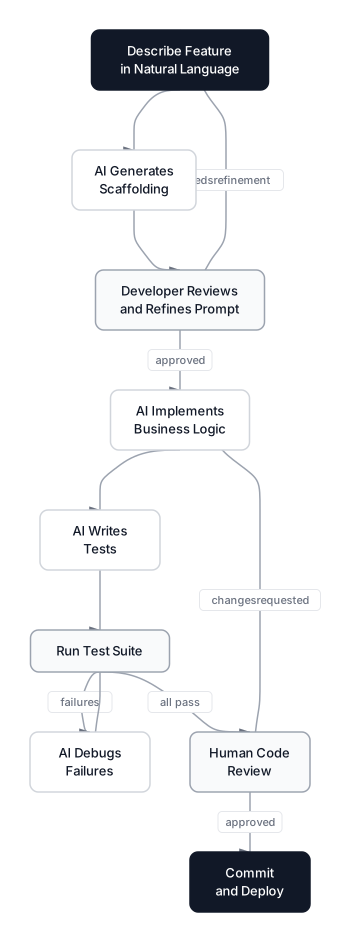 Click to expandThe AI-augmented development workflow
Write prompts like you're briefing a senior contractor. Vague instructions produce vague code. "Build a dashboard" gets you something generic. "Build a dashboard that shows monthly expense totals by category as a bar chart, uses the existing Supabase expenses table, and matches the Tailwind design system in globals.css" gets you something usable. Include file paths, variable names, and constraints.
Always review authentication and authorization code line by line. AI-generated auth code frequently has subtle flaws: missing CSRF protection, overly permissive CORS, or row-level security policies that don't cover edge cases. Sarah caught a bug where the AI-generated Supabase RLS policy allowed users to read receipts from other organizations if they knew the receipt UUID.
Generate tests with AI, then verify they actually test something meaningful. AI is excellent at producing tests that pass. It's less excellent at producing tests that catch real bugs. Watch for tests that re-implement the function under test, assert on hardcoded values, or skip error handling entirely.
Maintain architectural authority. Let AI write the implementation, but make structural decisions yourself. Which database? What folder structure? Monorepo or separate services? If you hand these calls to AI, you'll end up with an inconsistent architecture where different features use different patterns because different prompts led to different solutions.
Pro Tip: Keep a CONVENTIONS.md or rules file in your repo root describing your project's architecture, naming patterns, and tech stack choices. Both Cursor and Claude Code read these files automatically, producing output that matches your existing patterns instead of inventing new ones.
Risks and Criticisms
Criticism of vibe coding is serious, backed by data, and worth taking honestly.
Security vulnerabilities are real. According to the Veracode 2025 GenAI Code Security Report, 45% of AI-generated code across 100+ LLMs introduces OWASP Top 10 vulnerabilities. Java was worst at a 72% security failure rate. Cross-Site Scripting defenses failed in 86% of relevant samples. A separate analysis of 470 open-source GitHub pull requests found AI co-authored code had 2.74x more security vulnerabilities than human-written code. In May 2025, the vibe coding platform Lovable shipped 170 web applications with publicly accessible personal information (CVE-2025-48757) after researchers found that missing or misconfigured Supabase Row Level Security (RLS) policies allowed attackers to query data they should never have had access to.
Technical debt accumulates faster. Without a unified architectural vision, AI generates solutions based on individual prompts, creating a patchwork codebase. Apiiro documented a 10-fold increase in monthly security findings between December 2024 and June 2025 across codebases with heavy AI usage.
Skill atrophy is a legitimate concern. If junior developers learn to code primarily through vibe coding, do they ever develop the mental models needed to debug production systems at 2 AM? According to the Stack Overflow 2025 survey, 46% of developers don't trust AI output accuracy (up from 31% the prior year), and only 3% report "highly trusting" AI-generated code. Trust is declining even as adoption rises.
When to Vibe Code / When NOT to Vibe Code
Vibe code when:
- Building prototypes, MVPs, or internal tools where speed matters more than polish
- Scaffolding new projects with well-known tech stacks (Next.js, Rails, Django)
- Writing boilerplate: CRUD endpoints, form validation, data transformation
- Generating tests, especially for code you wrote manually
- Exploring unfamiliar APIs or libraries (faster than reading docs for simple use cases)
- Doing large-scale refactors with clear, mechanical rules ("rename X to Y across the codebase")
Do NOT vibe code when:
- Writing security-critical code: authentication, encryption, payment processing
- Implementing novel algorithms without reference implementations in training data
- Working in highly regulated environments (healthcare, finance) where every line needs audit trails
- Building infrastructure that's expensive to change later (database schemas, API contracts)
- Requirements are ambiguous and you haven't thought them through yet (AI will happily build the wrong thing very fast)
Conclusion
Vibe coding is neither magic nor hype. Karpathy himself acknowledged this in February 2026, posting that the field has evolved from vibe coding into what he calls "agentic engineering," where developers orchestrate AI agents rather than write code directly, with 99% of code generated by agents under human oversight. It's a genuine shift in the developer workflow that saves real time on the right tasks and creates real problems when applied carelessly. The AI coding assistant market has crossed $8.5 billion globally, Cursor alone hit $2 billion ARR, and 85% of developers now regularly use AI tools. Adopting them isn't the question. Adopting them without trading speed today for technical debt tomorrow is.
Developers getting the most value treat these tools the way you'd treat a talented but inexperienced contractor: give specific briefs, review the output carefully, and never hand over architectural decisions. Sarah shipped her expense tracker in three days instead of two weeks. She also caught four security issues the AI introduced and rewrote the error handling from scratch. Both facts are true simultaneously.
To understand the models powering these tools, start with how large language models actually work. For the agent patterns behind tools like Claude Code and Devin, read about building AI agents with ReAct and planning. And to see how retrieval makes coding assistants smarter, check out retrieval-augmented generation. Your job is to know when these tools are doing good work and when they're confidently generating nonsense.
Frequently Asked Interview Questions
Q: What is vibe coding, and how does it differ from traditional AI-assisted coding?
Vibe coding, coined by Andrej Karpathy in February 2025, means describing software in natural language and accepting AI-generated code without necessarily reviewing every diff. Traditional AI-assisted coding uses tools like autocomplete where the developer still writes and fully understands the code. Collins Dictionary named it their 2025 Word of the Year.
Q: Explain the four main stages of how an AI coding assistant processes a request.
Context gathering collects the current file, open tabs, imports, and project structure. Retrieval searches the codebase index and documentation for relevant code patterns. Model inference processes assembled context through an LLM to generate completions or multi-file edits. Validation runs generated code through tests and linters, feeding errors back for iterative correction.
Q: How do you reconcile the METR study's 19% slowdown finding with studies showing 55% speed improvements?
They measure different populations and task types. GitHub's 55% improvement covered isolated, well-specified tasks. METR tested experienced developers on 246 tasks in mature projects where they averaged 5 years of prior experience. AI tools accelerate boilerplate and greenfield development but can slow you down in complex, context-heavy work where verifying near-correct output costs more than writing it yourself.
Q: What security risks are specific to AI-generated code?
Veracode's 2025 report found 45% of AI-generated code introduces OWASP Top 10 vulnerabilities, with Java at a 72% failure rate and XSS defenses failing 86% of the time. Teams should enforce mandatory human review of auth code, run SAST on every AI-generated commit, and treat AI output as untrusted input requiring the same scrutiny as a third-party contribution.
Q: Compare the architecture of Cursor, Claude Code, and Devin.
Cursor wraps AI into a forked VS Code IDE with parallel background agents on cloud VMs, giving instant feedback loops but tying you to their editor. Claude Code runs in the terminal with no GUI, treating your entire dev environment as tools, offering maximum flexibility for CLI-comfortable developers. Devin operates in a fully sandboxed cloud environment, enabling true autonomy but sacrificing the tight iteration loop of local tools.
Q: How does retrieval quality affect AI-generated code, and what is MCP?
Retrieval quality is the single biggest factor in whether AI generates useful code or hallucinated nonsense. When an assistant retrieves your existing type definitions, database schema, and established patterns, it generates code that fits naturally into your project. MCP (Model Context Protocol) standardizes how AI tools pull in external documentation and context, making retrieval more consistent across different tools.
Q: When should a development team avoid vibe coding entirely?
Avoid vibe coding for security-critical code paths (authentication, encryption, payment processing), regulated environments requiring audit trails, novel algorithms not well-represented in training data, and foundational architecture decisions like database schema design. The Lovable incident, where 170 apps shipped with misconfigured Supabase RLS policies exposing user databases, illustrates what goes wrong.
Q: What is the "first 80% vs. last 20%" problem in vibe coding?
AI tools can generate 80% of a project remarkably fast, creating a false sense of completion. The remaining 20%, edge cases, error handling, security hardening, and production polish, often takes longer than expected because AI-generated code hides subtle bugs under superficially correct output. Experienced teams budget review and hardening time proportional to the speed of initial generation.