
You spent three weeks building a churn prediction model. The AUC hit 0.89, feature importance made sense, and the confusion matrix looked clean. You walked into a meeting with the VP of Customer Success, shared your slides, and got the one response every analyst dreads: "Cool. So what should we actually do?"
The model was fine. The communication killed it.
Data storytelling is the practice of combining data, visuals, and narrative structure to deliver insights that drive specific business decisions. It's the difference between reporting that "monthly retention dropped 4.2 percentage points" and explaining that "we're losing $380K per month because our onboarding flow breaks on mobile, and here's exactly how to fix it." In a 2024 CHI study, participants answered questions about key data points more accurately when insights were wrapped in narrative rather than presented as conventional charts. That finding matches what most of us already feel: numbers alone don't move people. Stories do.
This article walks through the full process of turning analysis into action, using a single running example: a SaaS company investigating why customer retention is declining and presenting findings to the leadership team. Every framework, visualization principle, and communication technique maps back to this one scenario.
Data Storytelling Defined
Data storytelling is the structured practice of translating statistical findings into narratives that non-technical stakeholders can understand and act on. Unlike exploratory analysis (where you hunt for patterns in data), data storytelling is explanatory: you already know the answer, and your job is to guide the audience to that same conclusion as efficiently as possible.
The distinction matters. Exploratory analysis asks "what's happening?" Explanatory communication answers "why it matters and what to do next." Most analysts spend 80% of their time on exploration and 5% on explanation. The ratio should be closer to 60/40. As Brent Dykes writes in Effective Data Storytelling, narratives are more powerful than raw statistics and more enduring than pretty charts. You need both, working together.
Key Insight: Data storytelling isn't about "dumbing down" the numbers. It's about prioritizing signal over noise and translating statistical significance into business significance.
The Three Pillars
Effective data stories sit at the intersection of three elements:
| Pillar | What It Provides | Without It, You Have... |
|---|---|---|
| Data | Evidence and truth | ...opinion (ungrounded) |
| Visuals | Clarity and focus | ...a report (dense text) |
| Narrative | Context and meaning | ...a dashboard (no persuasion) |
Data alone gives you a spreadsheet. Visuals alone give you decoration. Narrative alone gives you fiction. All three together create something that actually changes decisions.
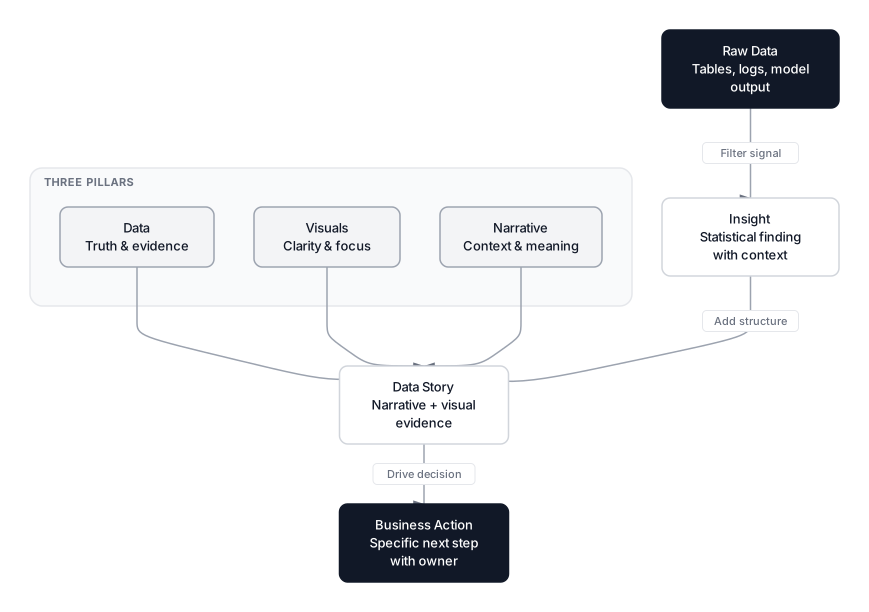 Click to expandData to action pipeline showing how raw data becomes insight, then story, then business action through the three pillars of data, visuals, and narrative
Back to our retention example: the data is the churn rate by cohort and the support ticket logs. The visual is a focused bar chart showing that churn triples after the third support ticket. The narrative is the SCQA framework (covered next) that connects those numbers to a $380K monthly revenue problem and a specific fix.
The SCQA Framework for Structuring Data Stories
SCQA stands for Situation, Complication, Question, Answer. Developed by Barbara Minto at McKinsey (and detailed in her book The Pyramid Principle), it's the standard structure used by top consulting firms to present complex findings to executives who have five minutes of attention.
Here's SCQA applied to our retention scenario:
Situation: "Our SaaS platform maintained 92% monthly retention for 18 months straight. The product team shipped a redesigned onboarding flow in October."
Complication: "Since November, monthly retention dropped from 92% to 87.8%. That 4.2 percentage point decline represents $380K in lost monthly recurring revenue."
Question: "What caused the retention drop, and how do we reverse it before Q2 planning?"
Answer: "Mobile users hitting the new onboarding flow churn at 3x the rate of desktop users. The third-step form times out on mobile connections. Reverting the mobile onboarding to the previous version will recover an estimated $290K of the lost revenue within 60 days."
 Click to expandThe SCQA framework showing the flow from Situation through Complication to Question to Answer
Notice a few things about this structure. First, the Answer contains a dollar amount, a timeline, and a specific action. "We should look into this" is not an answer. Second, the Situation establishes a baseline everyone agrees on before introducing tension. Third, the Question frames the problem in business terms ("before Q2 planning"), not technical ones ("what's our p-value").
Pro Tip: In written reports, lead with the Answer and then back it up with S-C-Q. Executives scan the first paragraph. In live presentations, build toward the Answer for dramatic effect. Match the format to the medium.
When SCQA Is the Wrong Framework
SCQA works best for persuasive, recommendation-driven presentations. It's less useful when:
- You're presenting exploratory findings with no clear recommendation yet. Use a hypothesis-driven structure instead: "We investigated X, Y, and Z. Here's what we found."
- The audience is technical peers reviewing methodology. They want your approach, not your conclusion first.
- You're delivering a status update. Just use a dashboard.
| Situation | Best Framework | Why |
|---|---|---|
| Executive recommendation | SCQA | Answer-first, action-oriented |
| Technical peer review | Methodology-first | Audience evaluates your process |
| Status update | Dashboard with KPIs | No narrative needed |
| Ambiguous findings | Hypothesis-driven | Multiple interpretations possible |
| Crisis communication | Inverted pyramid | Most critical info first |
Why Stories Stick and Statistics Don't
Our brains process narrative and raw data through fundamentally different pathways. When you hear a list of statistics, language processing regions (Broca's and Wernicke's areas) activate to decode meaning. It's effortful. When you hear a story, your brain also engages motor cortex, sensory cortex, and the limbic system. Oxytocin (the trust hormone) and dopamine (the reward chemical) release. You don't just process the information; you experience it.
Stanford professor Chip Heath found that 63% of people could remember a story after a presentation, while only 5% could recall a single statistic. That's a 12x gap in retention, and it explains why so many technically brilliant analyses die in the boardroom.
In Plain English: Telling someone "retention dropped 4.2 percentage points" activates their language centers. Telling them "Sarah, a customer for three years, left last week because our mobile onboarding crashed during her team's setup" activates their empathy, their memory, and their motivation to fix it. Same data. Different brain pathways. Different outcomes.
This doesn't mean you abandon rigor. The specific example anchors the abstract statistic. You present both: the story first to create emotional engagement, then the data to provide the evidence. "Sarah isn't alone. 1,847 mobile users hit the same timeout last month. That's $380K in lost MRR."
The Anchoring Sequence
The most effective pattern is:
- Specific example (one person, one event, one moment)
- Scale it up (how many people, how much money, how often)
- Connect to action (what we do about it, who owns it, by when)
This is how you move from "interesting finding" to "approved project with a budget."
Audience-First Chart Selection
The biggest visualization mistake analysts make is presenting exploratory charts in explanatory contexts. That gorgeous 50-feature correlation heatmap you used to find patterns? It's useless in a stakeholder meeting. Different audiences need different chart types, different levels of detail, and different framing.
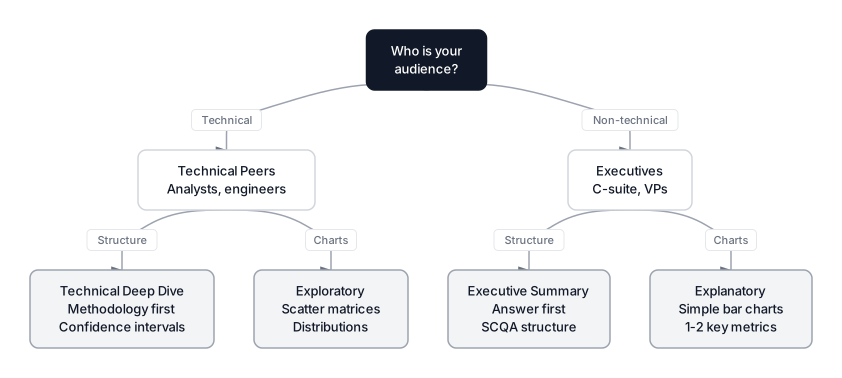 Click to expandAudience-chart selection matrix showing how technical vs executive audiences need different chart types and presentation structures
Exploratory vs. Explanatory Visuals
| Dimension | Exploratory | Explanatory |
|---|---|---|
| Goal | Discover patterns | Communicate one insight |
| Detail | High density, many variables | Low density, curated |
| Audience | You or technical peers | Managers, stakeholders, execs |
| Color | Multiple hues for categories | Gray for context, one color for emphasis |
| Title | Descriptive ("Revenue by Region") | Insight-driven ("West Region Fell 20%") |
| Example | Scatter matrix of 15 features | Single bar chart of top 3 churn drivers |
A common failure mode is copy-pasting exploratory plots into slide decks. If you built a chart to discover something, rebuild it to communicate what you found. These are two different jobs.
Common Pitfall: Never show a chart and ask "What do you see here?" You are the guide. Your job is to tell the audience what to see, why it matters, and what to do about it. If the chart needs interpretation, you haven't simplified it enough.
For our retention example, the exploratory chart might be a correlation matrix showing relationships between 12 features and churn. The explanatory chart should be a single bar chart: "Churn Rate by Number of Support Tickets Filed" with bars 3+ highlighted in a distinct color. One chart. One insight. One action.
For more on the discovery phase that precedes storytelling, see Stop Plotting Randomly: A Systematic Framework for Exploratory Data Analysis.
Decluttering Visuals with Gestalt Principles
Cognitive load is the mental effort required to process new information. Every element on a chart adds load: gridlines, axis ticks, legends, borders, 3D effects, rainbow palettes. To tell a clear story, you must strip away everything that doesn't directly support the insight. Cole Nussbaumer Knaflic's Storytelling with Data calls this "eliminating chart junk," and it's one of the highest-impact skills you can develop.
The Gestalt principles of visual perception explain why certain designs work better than others.
Proximity
Objects close together are perceived as related. Place labels directly on data lines instead of in a separate legend box. This eliminates the back-and-forth eye scanning that legends require.
Similarity
Objects that look alike are perceived as belonging to the same group. Use gray for all context data (historical quarters, benchmark values) and a single bold color only for the data point you're discussing. In our retention example, bars for months with normal retention are gray; the months after the onboarding change are highlighted.
Enclosure
Objects inside a boundary are perceived as a group. Use a shaded background region to highlight a specific time period on a line chart (e.g., "Post-Launch Window") to visually separate "before" from "after."
The Squint Test
Squint at your chart until the text blurs. What stands out? If gridlines or axis labels pop more than the data trend, you have a clutter problem. The data, and specifically the insight within the data, should be the most visually prominent element on the page.
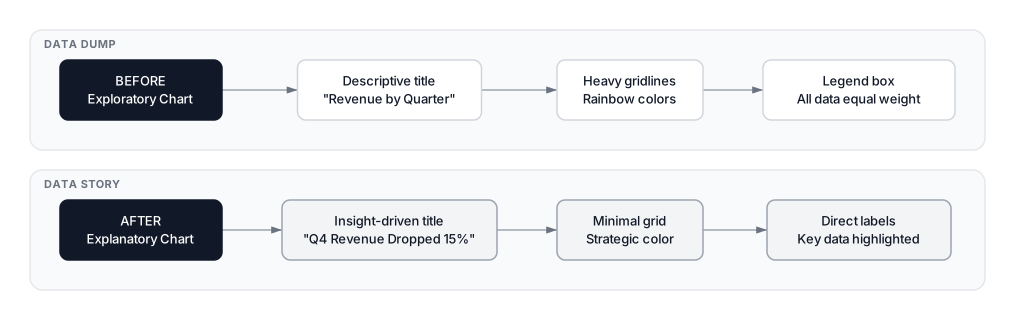 Click to expandBefore vs after visualization transformation showing how descriptive titles, heavy gridlines, and legend boxes become insight-driven titles, minimal grid, and direct labels
Before and After Decluttering
| Element | Before (Cluttered) | After (Clean) |
|---|---|---|
| Title | "Churn Rate vs Support Tickets" | "Churn Triples After 3rd Ticket" |
| Gridlines | Heavy, every 5% | Removed or very faint |
| Colors | Rainbow (every bar different) | Gray for context, red for alert |
| Labels | Y-axis only | Direct labels on each bar |
| Legend | Box at bottom | None needed (colors are self-explanatory) |
| Bars | 3D with shadow effects | Flat 2D |
The following code demonstrates this transformation. The first chart is a standard exploratory visualization. The second applies Gestalt principles to turn the same data into an explanatory story.
The left chart asks the viewer to interpret the slope and mentally calculate where the danger zone starts. The right chart tells you: the danger zone starts at ticket three. Gray bars are normal. Red bars are the problem. The title is the insight, not a description. Every design choice serves the narrative.
Translating Insights into Recommendations
A data story fails if it ends with "here's the data." It must end with "here's what we should do." The bridge between insight and action has two spans: the "So What?" (why it matters) and the "Now What?" (what to do about it).
The "So What?" Layer
This converts a statistical finding into business impact.
- Statistical observation: "Mobile onboarding users who hit the timeout error churn at 3.1x the rate of users who complete onboarding successfully."
- So What: "The timeout bug introduced in October's redesign is directly responsible for $290K of the $380K monthly MRR decline. It affects 23% of all new signups."
Notice the "So What" adds dollars, scope, and attribution. It answers the question a VP actually cares about: "How much is this costing us?"
The "Now What?" Layer
This translates the context into specific, assignable business steps.
- Now What: "Revert the mobile onboarding flow to the September version. The engineering estimate is 3 days. Based on current churn velocity, this should recover $290K/month within 60 days. Product should then A/B test the redesigned flow against the legacy version before redeploying."
If you're uncomfortable making direct recommendations, frame them as options: "Based on this data, we have two paths. Path A: revert the mobile flow immediately, recovering the most revenue with minimal engineering effort. Path B: patch the timeout bug in the new flow, which takes longer but preserves the redesign. The data supports Path A for speed, but Path B if the redesign's long-term metrics matter more."
Pro Tip: Always attach an owner and a deadline to your recommendation. "We should fix this" is a wish. "The mobile team should revert the onboarding flow by Friday" is a decision.
For rigorous before-and-after measurement of these changes, our guide on A/B Testing Design and Analysis covers how to prove that your fix actually caused the improvement.
The Full Churn Report Transformation
Let's see the complete before-and-after of presenting the same retention analysis. This is the single most impactful skill shift in data communication.
The "Data Dump" Version (What Most Analysts Do)
Slide title: Model Evaluation Metrics
Content:
- Confusion matrix (True Positives, False Negatives, etc.)
- ROC curve with AUC = 0.89
- Bullet points: "Random Forest model trained on 47K rows. Precision 0.78. Recall 0.71."
- Feature importance chart with 15 bars
Audience reaction: "Is 0.89 good? What does this mean for our budget? Can we move on to the next topic?"
The "Data Story" Version (What Changes Decisions)
Slide title: We Can Recover $290K/Month by Fixing Mobile Onboarding
Content:
- Visual: A single bar chart comparing "Cost of Continued Churn" vs. "Cost of Fix" (3 engineering days)
- Narrative: "Since October, 1,847 mobile users hit a timeout error during onboarding. These users churn at 3.1x the baseline rate. The fix is a 3-day revert. The ROI is 97:1 in the first month alone."
- Call to action: "Engineering team to revert by Friday. Product to design an A/B test for the new flow by end of month."
The ROC curve doesn't appear on the slide. The implication of the model (we can identify who's at risk and why) is translated into dollars and a deadline. The technical details live in an appendix for anyone who wants them.
| Aspect | Data Dump | Data Story |
|---|---|---|
| Title | Model Evaluation Metrics | Recover $290K/Month by Fixing Mobile Onboarding |
| Lead visual | Confusion matrix | Cost comparison bar chart |
| Key metric | AUC = 0.89 | $290K/month recoverable |
| Language | "Precision is 0.78" | "1,847 users hit the timeout bug" |
| Ends with | "Questions?" | "Engineering reverts by Friday" |
| Audience leaves with | Confusion | A decision |
Common Pitfalls in Data Storytelling
The Crime Thriller Reveal
Don't save your main finding for the last slide. Executives might leave the room after five minutes, get pulled into another meeting, or stop paying attention at slide three. Give the ending first. In business, spoilers are a feature, not a bug.
False Precision
Reporting that "monthly churn cost is $379,841.23" distracts the audience. Round it: "$380K." High precision implies certainty that usually doesn't exist and adds cognitive load with zero information gain. Save the exact numbers for your appendix or your data validation documentation.
Confusing Correlation with Causation
Be precise with your narrative language. Don't say "the onboarding redesign caused churn to increase" unless you've run a controlled experiment (like an A/B test). Instead, say "churn increased after the redesign, and mobile users are disproportionately affected." The causal language comes after you've controlled for confounding variables.
For a deeper discussion of this distinction, see Correlation Analysis: Beyond Just Pearson.
Overloading a Single Chart
If a chart needs a paragraph of explanation, it's doing too much. Split it into two simpler charts. One chart, one insight. Your audience can't process two findings from the same visual simultaneously.
Forgetting the Audience's Incentives
A chart about model accuracy doesn't move a sales VP. A chart about revenue recovered does. Always translate your findings into the currency your audience cares about: dollars, customers, time saved, risk reduced, or competitive advantage.
When to Use Each Storytelling Format
Different contexts call for different formats. Knowing which one to pick is itself a skill.
| Format | Best For | Length | Example |
|---|---|---|---|
| Slide deck (SCQA) | Executive recommendations | 5-10 slides | "Revert onboarding to save $290K/month" |
| Written memo | Complex analysis with appendix | 2-3 pages + appendix | Quarterly churn deep dive |
| Dashboard annotation | Ongoing monitoring with context | 2-3 callout boxes | Monthly retention dashboard |
| Slack/email summary | Quick wins, urgent findings | 3-5 sentences | "Mobile timeout bug found, $290K impact" |
| Jupyter notebook | Technical peer review | Variable | Full methodology and code |
| One-pager | Cross-functional alignment | 1 page, heavily visual | Proposed A/B test design |
Key Insight: The format should match the audience's decision-making context. An executive reading on their phone between meetings needs a 3-sentence Slack message, not a 40-page notebook. The same analysis might need three different formats for three different audiences.
Building a Data Storytelling Practice
Data storytelling isn't a one-time skill. It's a practice you build through repetition and feedback. Here are the habits that separate good analysts from great communicators.
Start with the "One Sentence" Test
Before you build a single chart, write down: "If my audience remembers only one sentence from this presentation, it should be ___." Build your entire story around that sentence. For our example: "We're losing $380K/month because mobile onboarding is broken, and we can fix it in three days."
Get Feedback on Your Communication, Not Just Your Analysis
Most code reviews focus on methodology. Ask a non-technical colleague to review your slides. If they can't explain the main finding and recommendation back to you in their own words, your story needs work.
Build a Personal Chart Library
Keep a folder of effective visualizations you've seen in publications, conference talks, or internal reports. When you need to communicate a new finding, browse your library for structural inspiration. The best data storytellers are voracious collectors of visual patterns.
Practice the "So What?" Chain
After every finding, ask "So What?" three times. The first answer is usually too technical. The second gets closer to business impact. The third is usually the one worth presenting.
- Finding: "Feature X has the highest SHAP value in our churn model."
- So What #1: "Feature X is the most predictive variable for churn." (still technical)
- So What #2: "Users who experience X are 3x more likely to leave." (getting closer)
- So What #3: "Fixing X could save us $290K/month." (ready for the boardroom)
Conclusion
Data storytelling is the skill that turns analysts into strategic partners. The technical work of building models, cleaning data, and running statistical tests is necessary but not sufficient. If your insights don't make it out of the notebook and into a decision, they don't count.
The core workflow is clear: find the truth through exploratory analysis, filter for significance (the "So What?"), structure the narrative with SCQA, declutter your visuals with Gestalt principles, and close with a specific recommendation (the "Now What?"). Every step serves the same goal: reducing the distance between a statistical finding and a business action.
The framework applies whether you're presenting a churn model, an A/B test result, or a probability distribution analysis. The audience changes, the data changes, the format changes. But the principle stays the same: respect your audience's time, tell them what matters, and tell them what to do about it.
Next time you present, start with the sentence you want them to remember. Then build everything else around it.
Frequently Asked Interview Questions
Q: Walk me through how you would present a finding that contradicts your stakeholder's hypothesis.
Start with their hypothesis and acknowledge the reasoning behind it. Then present the data that tells a different story, framing it as "the data surprised us too." Use the SCQA framework: Situation (their hypothesis), Complication (what the data actually shows), Question (what should we do given this new evidence), Answer (your recommendation). Never make the stakeholder feel attacked. Make the data the protagonist, not the person who was wrong.
Q: What is the difference between exploratory and explanatory data analysis, and how does it affect your presentations?
Exploratory analysis is for you: scatter plot matrices, correlation heatmaps, distribution plots designed to find patterns. Explanatory analysis is for your audience: curated visuals designed to communicate one specific insight. The biggest presentation mistake is pasting exploratory charts into a stakeholder deck. Rebuild your charts for communication once you know the story you're telling.
Q: How would you present a model's performance to a non-technical executive?
Skip the confusion matrix, ROC curve, and F1 score. Translate model performance into business terms: "Our model identifies 78% of customers who will churn in the next 30 days. Targeting these customers with a retention offer costs $15K/month but prevents $290K in losses." Executives think in dollars, risk, and timeline. Appendix the technical metrics for anyone who wants to verify the methodology.
Q: You have five minutes to present a complex analysis. How do you structure those five minutes?
Minute one: state the answer and the recommendation (Pyramid Principle). Minutes two and three: show the single most compelling visual with the "So What?" explained. Minute four: address the most likely objection with data. Minute five: restate the recommendation with a specific next step, owner, and deadline. If someone asks for methodology details, offer to follow up after the meeting.
Q: What makes a good chart title for a business presentation?
An insight, not a description. "Revenue by Quarter" is descriptive and forces the viewer to interpret. "Q4 Revenue Dropped 15% After Campaign Pause" is insight-driven and tells the viewer what to see. Good chart titles make charts self-explanatory even without a presenter in the room.
Q: How do you handle a situation where the data is ambiguous and you can't make a clear recommendation?
Present the ambiguity honestly, but structure it as options. "The data supports two interpretations: A and B. Under interpretation A, we should do X. Under interpretation B, we should do Y. Here is the additional data we would need to distinguish between them, and I can get that analysis done by Friday." Never present ambiguity without a path forward.
Q: When would you choose a table over a chart in a presentation?
Tables work better when the audience needs exact numbers (financial reports, parameter configurations) or when comparing more than three dimensions simultaneously. Charts work better when showing trends, distributions, or comparisons where the relative size matters more than the exact value. A common best practice is to use charts in the main presentation and put supporting tables in the appendix.
Q: How do you ensure your data story is honest and not misleading?
Three rules. First, never truncate the y-axis to exaggerate a trend without clearly labeling it. Second, always show uncertainty: confidence intervals, error bars, or sample sizes alongside point estimates. Third, proactively address the strongest counter-argument in your presentation rather than hoping nobody asks. If your story only works by hiding data, the story is wrong.
Hands-On Practice
Effective data storytelling transforms raw analysis into persuasion. In this practical example. the 'Analyst's Journey': starting with standard Exploratory Data Analysis (EDA) to find a signal, and then refining that signal into an Explanatory Visualization that uses cognitive psychology principles (color, enclosure, proximity) to drive a business decision.
Dataset: Customer Analytics (Data Analysis) Rich customer dataset with 1200 rows designed for EDA, data profiling, correlation analysis, and outlier detection. Contains intentional correlations (strong, moderate, non-linear), ~5% missing values, ~3% outliers, various distributions, and business context for storytelling.
Notice the difference. The first chart asks the viewer to interpret the slope. The second chart respects the viewer's time by explicitly highlighting the business problem (the spike at 3+ tickets) and using color to separate 'normal behavior' (gray) from 'critical issues' (red). This is how you move from reporting data to influencing strategy.